AI와 디지털 도구
PowerShell로 윈도우 파일 목록 CSV로 추출하는 방법 | 파일명·날짜·크기·재생시간
크립토갈루아
2026. 8. 27. 15:32
728x90
PowerShell을 이용해 윈도우 폴더의 파일명, 수정일, 파일 유형, 크기, 동영상 재생시간을 CSV로 한 번에 추출하는 방법을 알아봅니다. Excel에서 한글이 깨지는 CSV 인코딩 문제 해결 방법도 함께 설명합니다.

아래 탐색기 화면처럼 파일명 / 수정 날짜 / 파일 유형 / 크기 / 동영상 길이까지 Excel에서 열 수 있는 CSV로 추출할 수 있는 가장 실용적인 방법은 PowerShell을 이용하는 것입니다. 특히 화면의 길이(00:37:03)까지 필요하다면 일반 dir 명령보다는 PowerShell이 좋습니다.
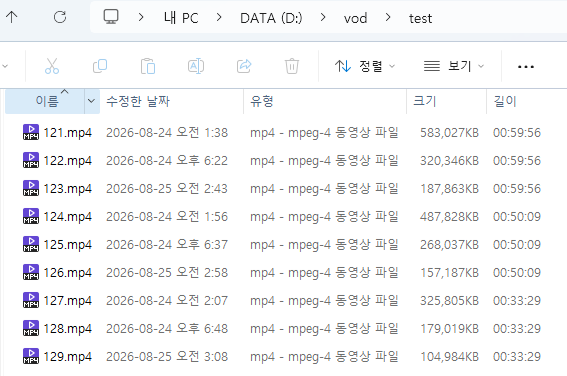
다음 코드를 파워셀에 붙여서 실행합니다.
$path = "D:\vod\test"
$output = "D:\vod\test\file_list.csv"

$shell = New-Object -ComObject Shell.Application
$folder = $shell.Namespace($path)

$result = foreach ($file in $folder.Items()) {

    if (-not $file.IsFolder) {

        $duration = $file.ExtendedProperty("System.Media.Duration")

        if ($duration) {
            $time = [TimeSpan]::FromTicks([int64]$duration)
            $durationText = $time.ToString("hh\:mm\:ss")
        }
        else {
            $durationText = ""
        }

        [PSCustomObject]@{
            "파일명"    = $file.Name
            "수정날짜"  = $file.ModifyDate
            "파일유형"  = $file.Type
            "크기(KB)"  = [math]::Round($file.Size / 1KB, 0)
            "길이"      = $durationText
        }
    }
}

$result | Export-Csv $output -NoTypeInformation -Encoding UTF8
다음 이미지와 같이 코드를 그대로 복사해서 붙여넣기만 하면 된다.
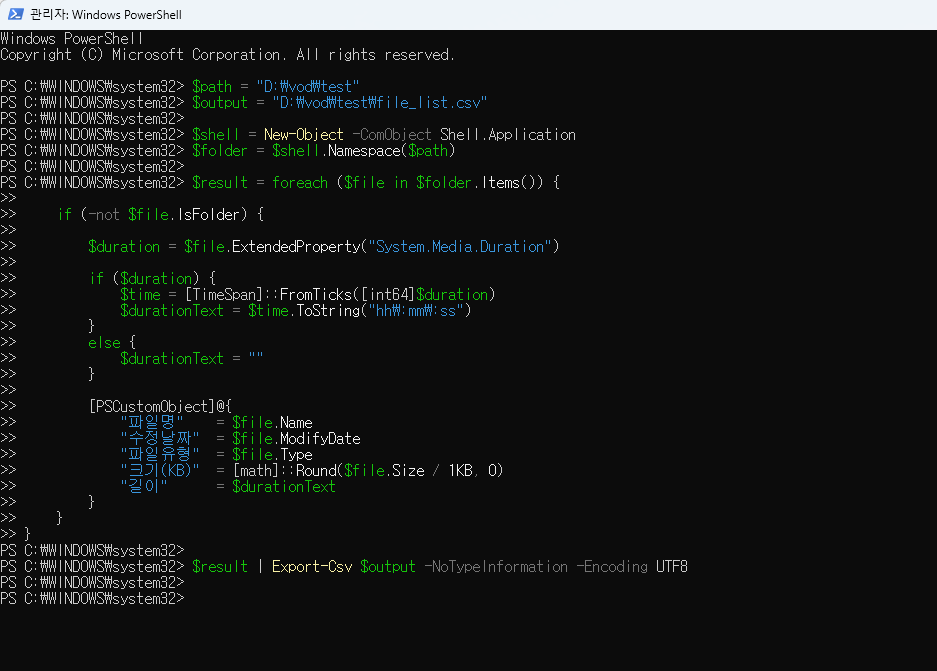
코드에서 지정한 폴더에 다음과 같이 csv 파일이 생성되었음을 알 수 있다.

해당 csv 파일을 열어보자. 혹시 아래와 같이 한글을 제대로 인식하지 못한다면 코드를 다음과 같이 수정한 후 실행해보자.
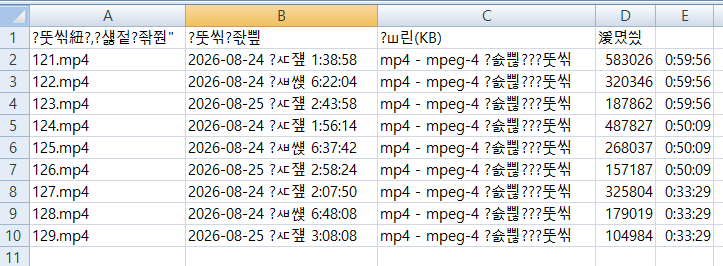
기존 코드 맨 아랫줄 UTF8 을 Default 로 변경하여 실행한다.
$result | Export-Csv $output -NoTypeInformation -Encoding UTF8이었다면, 이것을 아래처럼 바꿔주세요.
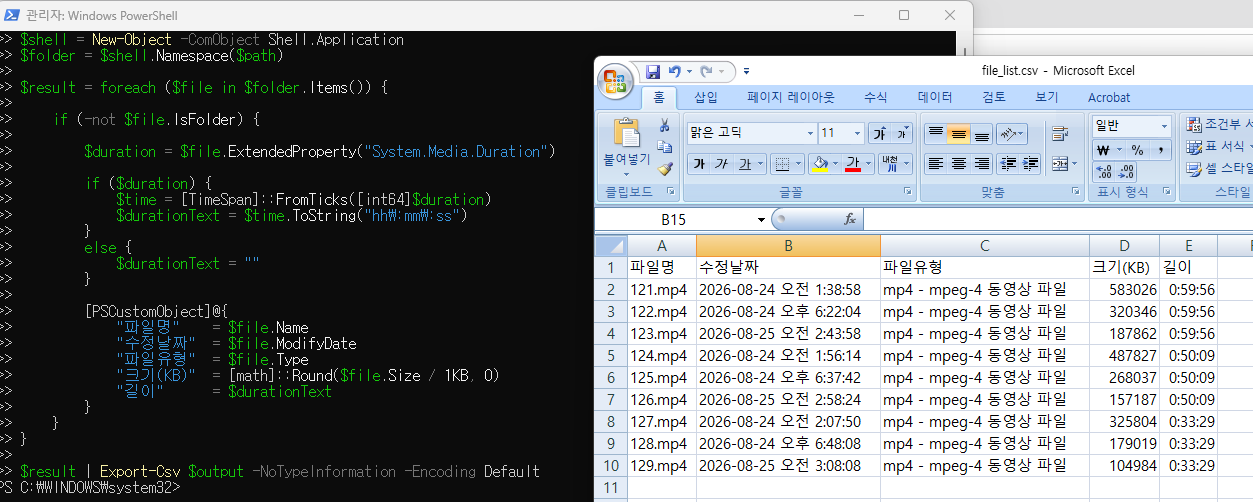
$result | Export-Csv $output -NoTypeInformation -Encoding Default한국어 Windows에서는 Default가 보통 CP949(한글 ANSI)로 저장되므로 Excel 2007에서 바로 열었을 때 한글이 정상적으로 표시됩니다. 즉, 전체 코드에서는 마지막 줄만 다음처럼 바꾸면 됩니다.
$path = "D:\vod\test"
$output = "D:\vod\test\file_list.csv"

$shell = New-Object -ComObject Shell.Application
$folder = $shell.Namespace($path)

$result = foreach ($file in $folder.Items()) {

    if (-not $file.IsFolder) {

        $duration = $file.ExtendedProperty("System.Media.Duration")

        if ($duration) {
            $time = [TimeSpan]::FromTicks([int64]$duration)
            $durationText = $time.ToString("hh\:mm\:ss")
        }
        else {
            $durationText = ""
        }

        [PSCustomObject]@{
            "파일명"    = $file.Name
            "수정날짜"  = $file.ModifyDate
            "파일유형"  = $file.Type
            "크기(KB)"  = [math]::Round($file.Size / 1KB, 0)
            "길이"      = $durationText
        }
    }
}

$result | Export-Csv $output -NoTypeInformation -Encoding Default
이제 정상적으로 한글이 표현됨을 알 수 있다.
728x90